Writing Class Reference Documentation
Warning
Please read our AI Policy before trying to contribute to the docs.
Not following them may result in a block from contributing!
See also
Don’t know how to contribute with git ?
Visit the Contributing with Git Tutorial to learn how to.
Thank you for taking the initiative to contribute, we are happy to have you help!
Class Reference Goals
When writing a class reference, the following goals should be remembered:
Class References should to INFORM the reader
After that, our secondary goal is to keep it accessible (Like the Article (Documentation) Goals )
The reason why this should be is because, most Modders, when they check a class reference most likely already know how to use it, they just need a refresher on the specifics, so we #1 focus on that.
We shouldn’t try to hard to teach them how to use it as that is what the Tutorials are for, but we should try to make it easier to understand for new Modders to understand, secondarily.
Where are the Class files?
If you ever tried to edit a class reference file you may have noticed the following comment:
.. DO NOT EDIT THIS FILE!!!
.. Generated automatically from TOML source using _tools/make_rst.py
.. Template file can be modified at _templates/class.rst.j2
Now this is here because as stated in the lines above, you should not edit those files directly as they are generated from our tool script, make_rst.py.
Now you may be wondering:
“Well if I cant edit the reference files there… Where do I edit them? “
Well, they are actually placed in the classes folder, in the more accessible TOML configuration file format.
(mirroring Godot )
We did this to make it easier to manually (and programmatically) read and write the class references. We also did this to make it extremely easy for us to keep utmost consistency with the layout of each file, making it as easy as possible to quickly find the item you are looking for.
TOML Specification
Now we do have a specific layout, and set of TOML fields you must follow to keep it valid.
Class Data (Header)
version = "1.9.20"
updated = "2024-04-04"
name = "BaseObj"
inherits = "Node2D"
script_path = "res://obj/BaseObj.gd"
scene_path = "res://obj/BaseObj.tscn"
desc = """
Class containing functionality that both [[class Fighter]] and [[class BaseProjectile]] use.

[b]Note:[/b] This class is missing functionality that is added by [[class Fighter]] and [[class BaseProjectile]].  Despite its name, all game objects that are not [[class Fighter]]s should extend [[class BaseProjectile]], not [[class BaseObj]] directly.
"""
category = "Game Objects"
Field |
Type |
Description |
|---|---|---|
|
|
YOMI Version. |
|
|
Last updated date ( |
|
|
The internal class’s name. |
|
|
The description for the class. Has BBCode capabilities. (Defaults to: |
|
|
The sidebar category’s name. |
|
|
The internal class it inherits from (either unique name, or its script path). |
|
|
The Godot Resource Path for the actual script defining the class. |
|
|
The Godot Resource Path for the defining scene that the script resides in (or just the parent scene). |
|
|
The raw Sphinx Reference to use when linking. |
|
|
A mapping of |
|
|
A mapping of |
|
|
A mapping of |
|
|
A mapping of |
Signal Data
[signals.action_selected]
desc = ""
Field |
Type |
Description |
|---|---|---|
|
|
The description for the signal. Has BBCode capabilities. (Defaults to: |
|
|
The raw Sphinx Reference to use when linking. |
|
|
A mapping of |
Constant Data
[constants.AUTO_PARRY_TICKS]
type = "int"
value = "20"
desc = ""
Field |
Type |
Description |
|---|---|---|
|
|
The datatype used for the constant. (Whether a Godot Class/Type or one of Ours ) |
|
|
The chosen value for the constant. |
|
|
The description for the constant. Has BBCode capabilities. (Defaults to: |
|
|
The raw Sphinx Reference to use when linking. |
Property Data
[properties.air_option_bar]
export = true
type = "int"
value = "0"
Field |
Type |
Description |
|---|---|---|
|
|
Flag for if the property is exported to the Godot Proprieties menu. |
|
|
Flag for if the property is defined, right as the _ready() signal is called. |
|
|
The datatype used for the property. (Whether a Godot Class/Type or one of Ours ) |
|
|
The chosen value for the property. |
|
|
The description for the property. Has BBCode capabilities. (Defaults to: |
|
|
The raw Sphinx Reference to use when linking. |
Method Data
[methods.set_pos]
type = "Variant"
desc = "Sets an object's position relative to the stage. For setting position relative to the object, see [[meth move_directly]]"
Field |
Type |
Description |
|---|---|---|
|
|
The return datatype of the method. (Whether a Godot Class/Type or one of Ours ) |
|
|
The description for the method. Has BBCode capabilities. (Defaults to: |
|
|
The raw Sphinx Reference to use when linking. |
|
|
A mapping of |
Parameter Data
    [methods.set_pos.params.x]
    type = "Variant"
    value = ""
    desc = ""
    _order = 0

    [methods.set_pos.params.y]
    type = "Variant"
    value = ""
    desc = ""
    _order = 1
Field |
Type |
Description |
|---|---|---|
|
|
The datatype for the parameter. (Whether a Godot Class/Type or one of Ours ) |
|
|
The default value for the parameter. |
|
|
The description for the parameter. Has BBCode capabilities. (Defaults to: |
|
|
The raw Sphinx Reference to use when linking. |
|
|
The location of the parameter in the above function. (Optional, if only 1 parameter) |
BBCode Tags
When adding/modifying the desc field of any item, we have an BBCode parsing layer on top to make adding styling easier.
Here is a list of BBCode-like tags we have access to:
Richtext BBCode Subset
Tag |
Usage |
Result |
|---|---|---|
Bold:
Makes surrounded text bold.
|
|
Some bolded text. |
Italics:
Makes surrounded text Italics.
|
|
Some italicized text. |
Underline:
Adds an underline to surrounded text.
|
|
Some underlined text. |
Strikethrough:
Adds a strikethrough to surrounding text.
|
|
Some strikethroughed text. |
Paragraph:
Forces text to be in a new paragraph.
Also has support for by adding the
align field.Supported alignment values are:
-
left/l-
center/c-
right/r-
fill/f |
|
Left, Centered, Right. |
Left:
Makes the text horizontally left-aligned.
|
|
Left Paragraph. |
Center:
Makes the text horizontally centered.
|
|
Centered Paragraph. |
Right:
Makes the text horizontally right-aligned.
|
|
Right Paragraph. |
Fill:
Makes the text horizontally justified.
(Trys to use the full width of available space)
|
|
A longer paragraph that is filling the area. |
Line Break:
Adds a line break in a text, without adding a new
paragraph.
|
|
This text is
split up into
multiple lines.
|
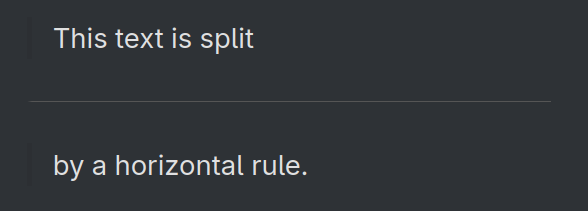
Horizontal Rule:
Adds new a horizontal rule to separate content.
|
|
|
Indent:
Causes any text inside to be indented to a
seemlier level to a list item.
|
|
Indented text |
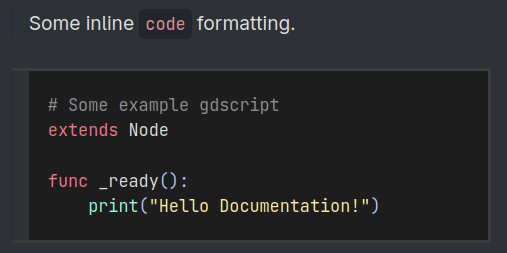
Code:
Makes surrounding text monospaced, and if
multiline adds syntax hightailing for the
chosen language.
|
Some inline [code]code[/code] formatting.[code=gdscript]# Some example gdscriptextends Nodefunc _ready():print("Hello Documentation!") |
|
URL:
Create a hyperlink to the inputted web url with an
optional display inner text.
|
|
This is a link to https://example.com. And this is links to this website. |
Image:
Embed an image onto the page, with optional width
and height.
|
|

|
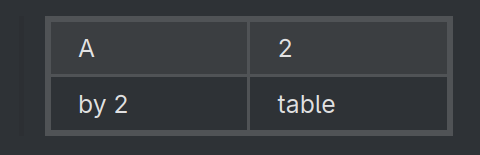
Tables:
Creates a table with a defined number of columns.
Use the
[cell] tag to define table cells. |
|
|
Unordered List
Adds an unordered list, with each line representing
its own list item.
|
[ul]Item 1Item 2Item 3[/ul] |
|
Ordered List
Adds an ordered list, with each line representing
its own list item.
|
[ol]Item 1Item 2Item 3[/ol] |
|
Left/Right Bracket:
Adds
[ and ] respectively.Used to bypass BBCode parsing.
|
|
This text is [b]not bold[\b]. |
Unicode Character:
Adds any Unicode character with it’s hexadecimal
UTF-32.
|
|
Look at this cool face ↦ ( ദ്ദി ˙ᗜ˙ ) |
Miscellaneous Unicode:
A bunch of miscellaneous tags that get
automatically converted into useful unicode
control characters.
|
|
|
Guidelines
Guidelines to use when writing a Class’s Reference.
These are some of the rules we like to follow when contributing to this project’s Class Reference files. If you want to edit a article file, read Writing General (Article) Documentation instead.
To start off, we recommend you reading both the Godot Content guidelines and Docs writing guidelines as those are the biases for our guidelines. Then we recommend reading the General Documentation Guidelines as most are applicable here as well.
Note
Now we don’t require you to follow these guidelines 100% to the tee (as this is a small community project after all) however, we do want you to try a follow them to the best of your ability.